You follow the recipe to the letter. The oven is preheated. The timer goes off. But what comes out is either burnt on the edges and raw in the middle, or pale and undercooked even after extra time. If this sounds familiar, your oven temperature may not be as accurate as the display claims. This is a surprisingly common problem — and one that affects everything from weeknight dinners to holiday baking.
In this guide, Tri-City Repairs explains why oven temperatures become inaccurate, how to verify the problem, and what you can do to fix it. We serve homeowners throughout Coquitlam, Port Coquitlam, and Port Moody with professional appliance repair you can count on.
How to Confirm Your Oven Temperature Is Off
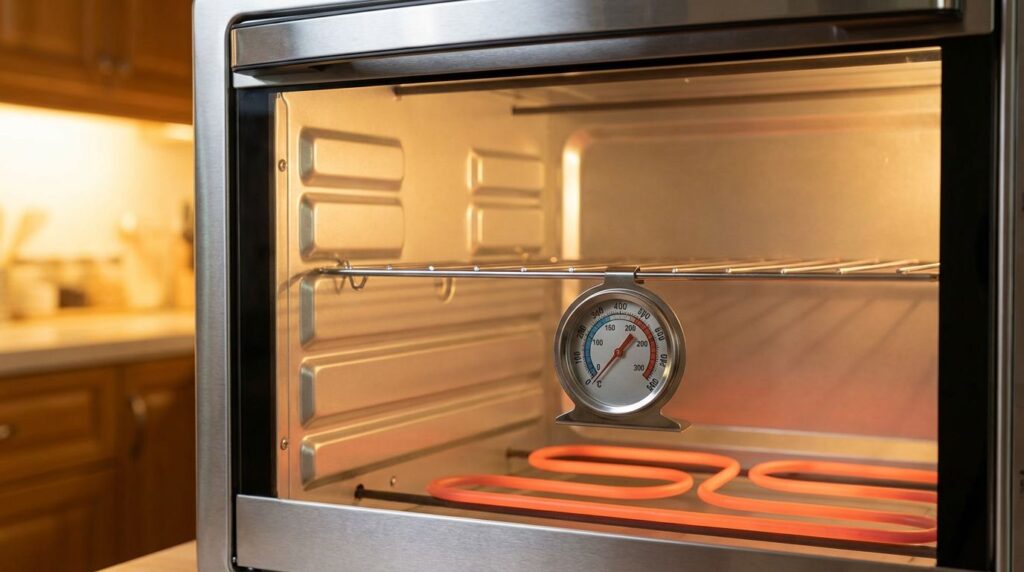
Before assuming your oven is faulty, verify it with an oven thermometer. These inexpensive devices (available at any hardware or kitchen store for around $10–$20) hang or sit inside the oven and give you an independent reading of the actual air temperature.
To test:
- Place the thermometer in the centre of the oven.
- Set the oven to 350°F (175°C) and allow it to fully preheat.
- Wait an additional 20 minutes after the preheat signal to let the temperature stabilize.
- Read the thermometer without opening the door if possible (or read it quickly).
A variance of plus or minus 25°F (about 14°C) is considered normal. If your thermometer shows a greater difference — say, 375°F when set to 350°F, or 300°F when set to 350°F — your oven has an accuracy problem worth addressing.
Why Oven Temperatures Become Inaccurate
1. Faulty Oven Temperature Sensor (RTD Probe)
Most modern ovens use a temperature sensor — often called an RTD (Resistance Temperature Detector) probe — to continuously monitor the actual oven temperature and signal the control board to turn the heating element on or off to maintain the set temperature. If this sensor is failing, it can send incorrect temperature readings to the control board, causing the oven to run too hot, too cold, or to cycle erratically.
Signs of a bad sensor: Temperature that fluctuates wildly during baking, food that’s consistently overcooked or undercooked, or an oven that never quite stabilizes at a steady temperature. On some models, a faulty sensor will trigger an error code on the digital display.
The temperature sensor is typically a thin metal rod protruding from the back interior wall of the oven compartment. It should not touch the oven walls. You can test it with a multimeter — at room temperature (68°F/20°C), most oven sensors should read around 1080–1090 ohms of resistance. If your reading is significantly higher or lower, the sensor needs replacing.
2. Worn or Failing Thermostat
Older ovens — and some newer ones — use a thermostat rather than an RTD sensor to regulate temperature. The thermostat is a mechanical or electromechanical device that opens and closes a circuit to control the heating element. Over time, the calibration of the thermostat drifts, causing it to read temperatures inaccurately.
On many older models, the thermostat can be recalibrated by rotating a set screw on the back of the temperature knob. Some newer models allow calibration adjustments through the control panel menu (check your owner’s manual). If recalibration doesn’t hold, the thermostat needs replacing.
3. Heating Element Cycling Incorrectly
Even with a perfectly accurate sensor, your oven won’t maintain correct temperatures if the bake element (the one on the bottom of the oven) or broil element (on the top) is partially failing. A bake element that doesn’t heat evenly — either due to a developing break or a hot spot — will create temperature inconsistencies across the oven cavity.
A related issue is covered in our post on Troubleshooting an Oven with Uneven Baking Results — if you’re getting food that’s burnt in one corner but raw in another, that’s likely an element or circulation issue rather than a pure temperature calibration problem.
4. Control Board Malfunction
The electronic control board (also called the ERC — Electronic Range Control) is the brain of a modern oven. It receives the temperature reading from the sensor and controls when the heating elements turn on and off. A failing control board may misinterpret sensor readings or fail to regulate the elements properly, resulting in temperature inaccuracy.
Control board issues are typically accompanied by other symptoms — error codes, unresponsive buttons, display glitches, or elements that stay on continuously. If the sensor tests correctly but temperatures are still wrong, the control board may be at fault.
5. Mineral or Residue Buildup on the Sensor
The oven temperature sensor can develop a coating of grease, carbon residue, or mineral deposits over time — especially in ovens that see heavy use without regular cleaning. This coating can insulate the sensor tip, making it read temperatures more slowly or inaccurately.
A gentle clean of the sensor tip (with the oven cool and disconnected from power) using a soft cloth can sometimes improve accuracy. This is also a good reason to keep the oven interior clean — buildup doesn’t just affect sensors. The Effects of Mineral Buildup on Your Appliance Performance covers how residue and deposits affect appliances across your home.
Calibrating Your Oven Temperature
If your oven is slightly off — say, running 25–50°F too hot or too cold — and the sensor and elements check out, calibration may be the answer. Many modern ovens allow you to adjust the calibration offset through a menu setting. The process varies by brand, but it typically involves:
- Entering a specific button combination (often “Bake” + “Start” or holding the temperature up/down buttons for several seconds)
- Entering the calibration menu
- Adjusting the offset up or down in 5°F increments
Check your owner’s manual for the exact procedure for your model. LG, Frigidaire, Whirlpool, and most other major brands offer this feature on digital ovens. This calibration is typically good for adjustments of up to 35°F above or below the factory default — larger variances indicate a component failure.
When the Problem Is More Than Just Calibration
If calibration doesn’t solve the problem, or if your oven is showing other warning signs — error codes, elements staying on continuously, or visible damage to the sensor or elements — a professional inspection is the right call. A technician can perform a full diagnostic, test each component accurately, and replace what’s needed without guesswork.
Not sure if repair is worth it for your oven? DIY vs Professional Appliance Repair: When to Call the Experts gives you a useful framework for thinking through the cost-benefit of repairing vs. replacing older appliances.
Practical Tips While You Wait for a Repair
If you know your oven runs, say, 25°F hot, you can compensate:
- Set the temperature 25°F lower than the recipe calls for.
- Use an oven thermometer to monitor the actual temperature and adjust as needed.
- Rotate baking pans halfway through cooking to compensate for hot spots.
- Use an instant-read thermometer to verify doneness rather than relying solely on time.
These workarounds are fine short-term, but for consistent baking and energy efficiency, getting the oven properly calibrated or repaired is worth doing sooner rather than later.
When to Call Tri-City Repairs
Temperature accuracy issues that don’t resolve with calibration adjustment typically need a new sensor, thermostat, or control board. Our technicians carry the diagnostic tools to test each component quickly and accurately. We serve the Tri-Cities area — Coquitlam, Port Coquitlam, and Port Moody — with same-day or next-day service in most cases.
Call Tri-City Repairs at (604) 359-5952 or book online at tricityrepairs.ca for professional oven repair service.